If you’ve used Visual Studio since 2010 or 2012, you know how easy it is to transform config files based on the build configuration.
If you’ve used SlowCheetah, you know how easy it is to transform config files (other than web.config) based on the build configuration OR Visual Studio publish profiles.
Adding a web.config transformation based on the project’s publish profiles can be a little unintuitive. Here’s how.
From an existing profile
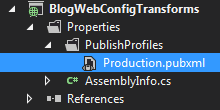
Right-click and choose \“Add Config Transform\”, not \“Add Transform\”.
